Solusi Directadmin phpMailer 550 Bad HELO – Host impersonating domain name
Jika anda menggunakan directadmin dan mengalami error di script phpmailer “550 Bad HELO – Host impersonating domain name” maka berikut ini adalah pembahasannya. Read more

Jika anda menggunakan directadmin dan mengalami error di script phpmailer “550 Bad HELO – Host impersonating domain name” maka berikut ini adalah pembahasannya. Read more

Jika anda mendapatkan error “too many Connections” maka artinya koneksi anda telah mencapai limit.
Jika anda menggunakan layanan mysql hosting atau shared hosting biasanya informasi tentang batasan / limit tersebut sudah kami jelaskan pada setiap halaman paket hosting.
Misalnya pada paket standart hosting paket WD-350MB tertulis database proses = 10.
Artinya limit konkurensi proses database maksimal 10 proses.
Proses tersebut umumnya berjalan sangat cepat dan bisa menampung banyak akses koneksi kecuali memang karena applikasinya sudah terlampau besar atau visitor sudah terlampau banyak.
Solusi
Biasanya solusi yang kami tawarkan adalah upgrade ke paket yang memiliki proses database lebih besar.
Jika anda menggunakan layanan vps untuk remote database atau sejenisnya dan mengalami too many connection maka anda bisa menaikkan limit max_connection.
Adapun caranya sebagai berikut :
# cat /usr/local/directadmin/conf/mysql.conf
show variables like "max_connections";+-----------------+-------+
| Variable_name | Value |
+-----------------+-------+
| max_connections | 151 |
+-----------------+-------+Anda akan melihat total max_connection seperti diatas.
Selain itu anda juga bisa melihat total koneksi yang digunakan dengan mengetikkan perintah
MariaDB [(none)]> show status like 'max_used_connections';
+----------------------+-------+
| Variable_name        | Value |
+----------------------+-------+
| Max_used_connections | 152   |
+----------------------+-------+
1 row in set (0.00 sec)
[mysqld]
max_connections = 1000;Demikian penjelasan yang bisa kami sampaikan tentang masalah too many connection pada database mysql dan semoga bermanfaat.
Kali ini kami mempunyai kasus kirim email via smtp menggunakan script PHPmailer dan ternyata error.
adapun errornya adalah sebagai berikut
Message could not be sent.Mailer Error: SMTP connect() failed
atau
SSL3_GET_SERVER_CERTIFICATE:certificate verify failed
adapun setting standar yang biasanya kami lakukan adalah seperti ini
$mail->isSMTP(); // Set mailer to use SMTP
$mail->Host = ‘mail.domain.com’; // Specify main and backup SMTP servers
$mail->SMTPAuth = true; // Enable SMTP authentication
$mail->Username = ‘info@domain.com’; // SMTP username
$mail->Password = ‘password’; // SMTP password
$mail->SMTPSecure = ‘none’; // Enable TLS encryption, `ssl` also accepted
$mail->Port = 587; // TCP port to connect to
tapi dengan setting tersebut diatas sekarang tidak berhasil.
Setelah menyelidiki ternyata ada tambahan konfigurasi untuk mendisable tls. yaitu dengan menambahkan $mail->SMTPAutoTLS = false;
informasi tersebut kami dapatkan dari sini
dan hasil akhir konfigurasi kami menjadi seperti ini
$mail->isSMTP(); // Set mailer to use SMTP
$mail->Host = ‘mail.domain.com’; // Specify main and backup SMTP servers
$mail->SMTPAuth = true; // Enable SMTP authentication
$mail->Username = ‘info@domain.com’; // SMTP username
$mail->Password = ‘password’; // SMTP password
$mail->SMTPSecure = ‘none’; // Enable TLS encryption, `ssl` also accepted
$mail->Port = 587; // TCP port to connect to
$mail->SMTPAutoTLS = false;
$mail->Hostname = “nama-hostname”;
Untuk nama-hostname bisa anda dapatkan dengan cara melihat reverse dns server anda.
caranya :
Per artikel ini ditulis setting phpmailer tersebut diatas berhasil. Jika ada pertanyaan silahkan tinggalkan pesan dikolom komentar bawah.

Kadang setelah anda merubah setting nameserver atau merubah dan menambah record dns domain ternyata domain subdomain belum resolve. Tunggu 1-2-3 jam belum juga resolve.
Apa penyebabnya dan Bagaimana solusinya?
Pada setiap pengecekan domain resolve selalu kami awali dengan tools test domain. Dalam hal ini kami selalu menggunakan tools berikut ini.
Mari kita mulai pengecekan.
jika terdapat error seperti ini
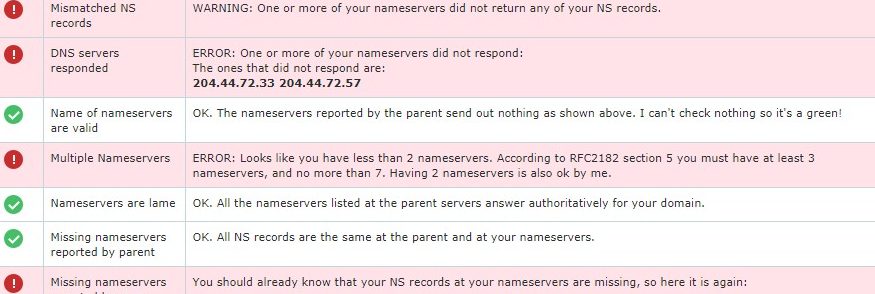
maka bisa dipastikan dns server provider hosting anda bermasalah.
Apa yang menyebabkan error tersebut?
Berikut ini beberapa hal yang memungkinkan terjadinya error tersebut.
Solusinya harus mengecek server dns dan memastikan 2 hal diatas berjalan normal.
Jika salah satu tidak terpenuhi maka error biasanya akan tetap berlanjut dan domain tidak akan resolve sampai permasalahan diselesaikan.
Biasanya domain tidak bisa anda akses disebabkan informasi dns belum menyebar keseluruh server dns internet service provider.
Kondisi tersebut diatas disebut sebagai waktu propagasi.
Cara mengujinya mudah saja.
Jika dengan tools tersebut menghasilkan yang seharusnya anda inginkan maka anda cukup menunggu saja.
Umumnya waktu tunggu propagasi adalah 1×24 jam.
Anda tahu sendiri beberapa ISP menyisipkan iklan, kemudian routing traffik ke server proxy tertentu, atau kebetulan dns server ISP bermasalah.
hal-hal diatas ini bisa menjadi salah satu aspek yang menyebabkan domain atau website anda tidak bisa diakses.
Biasanya dalam waktu singkat tapi bisa juga dalam tempo lama.
Tergantung ISP tersebut seberapa cepat menyelesaikan permasalahan pada server mereka.
Misalnya seperti kejadian 732 internal error.
Error tersebut disebabkan dari server provider internet yang anda gunakan.