Cara Login ke CPanel Hosting
Bagaimana cara login ke CPanel / Control Panel Hosting di Pusathosting? Adapun tahapannya adalah sebagai berikut : Read more

Bagaimana cara mengakses webmail di pusathosting? Untuk mengakses webmail anda bisa menggunakan nama domain anda http://mail.domain-anda.com. Read more
Jika anda ingin memindahkan domain dan hosting ke pusathosting maka berikut ini adalah panduan proses transfer domain dan Hosting serta proses migrasi datanya. Read more
Kali ini kami akan memberikan Panduan Menghapus isi Email lama dengan hitungan Harian. Panduan ini diperlukan ketika kasus over space email terjadi atau ingin menghapus email yang lama.
Dengan panduan ini maka anda tidak perlu repot menghapus isi email satu persatu.
Langsung saja ikuti panduan dibawah ini :
1. Silahkan login ke client area di http://client.pusathosting.com/clientarea.php (Email dan password ketika melakukan order Domain atau Hosting)
2. Setelah login, Klik menu Service -> Product -> (Pilih produknya) dan klik View Detail -> Klik tombol Login & Manage Account
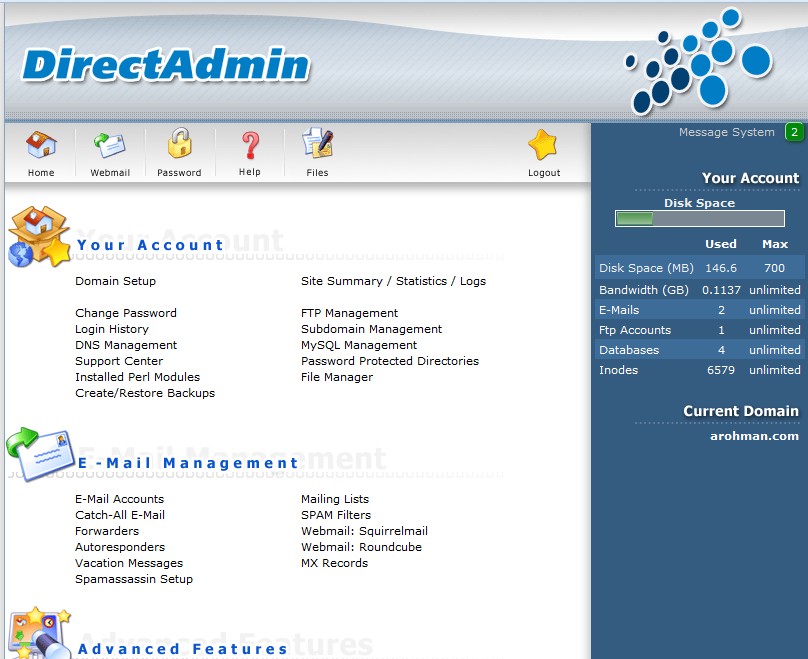
3. Sekarang sudah dihalaman Directadmin, Klik Email account (Pada Kategory Email Management). (Image 1.1)
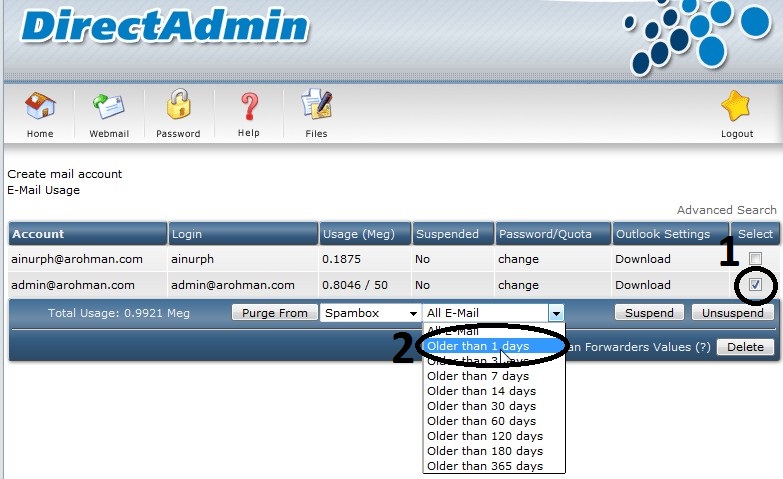
4. Setelah itu centang alamat email yang di inginkan dan Pilih Opsi pilihan delete harian nya. (Image 1.2)
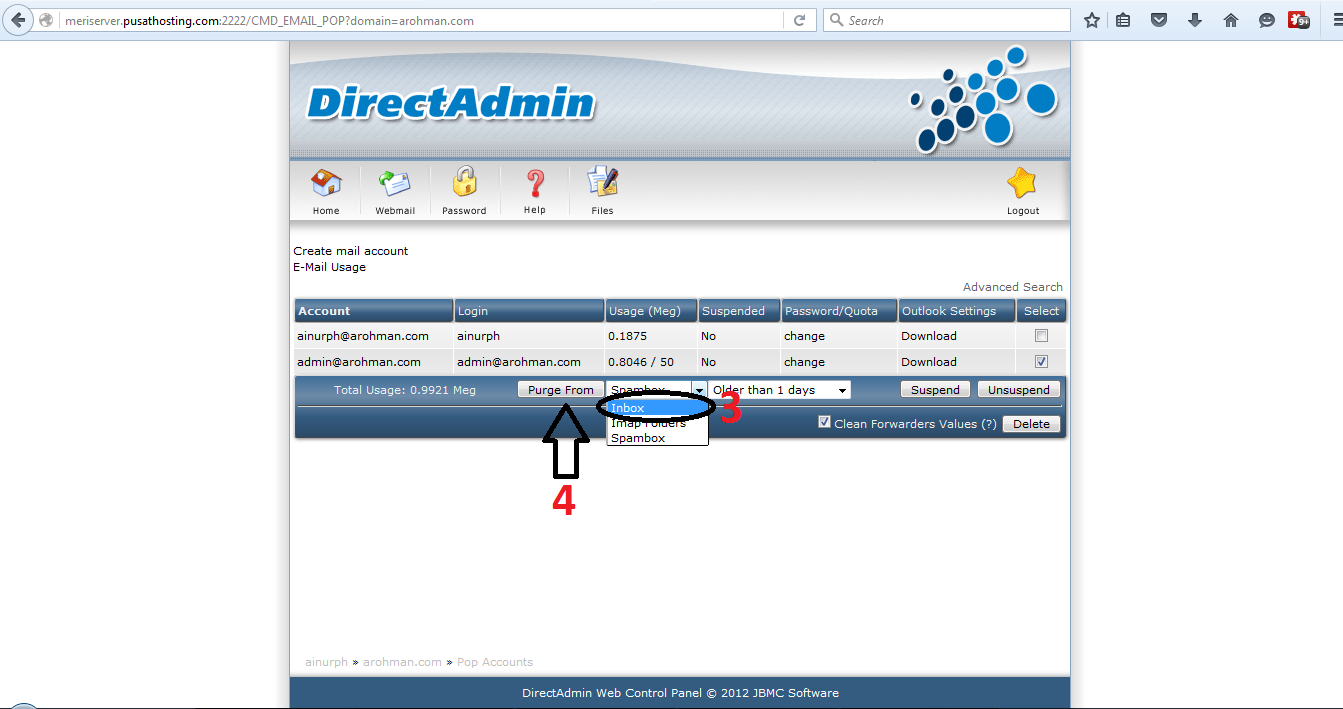
5. Kemudian, Pilih folder mana yang ingin didelete dan Setelah semuanya selesai tekan Tombol Purge Form. (Image 1.3)
6. Setelah semuanya dirasa sudah selesai, silakan cek spacenya.
Demikian panduan dari kami, semoga bermanfaat untuk kita semua.
Team PusatHosting
Jawaban apakah mengirim email massal masuk inbox tergantung beberapa hal berikut ini : Read more
This site uses cookies. By continuing to browse the site, you are agreeing to our use of cookies.
Accept settingsHide notification onlySettingsWe may request cookies to be set on your device. We use cookies to let us know when you visit our websites, how you interact with us, to enrich your user experience, and to customize your relationship with our website.
Click on the different category headings to find out more. You can also change some of your preferences. Note that blocking some types of cookies may impact your experience on our websites and the services we are able to offer.
These cookies are strictly necessary to provide you with services available through our website and to use some of its features.
Because these cookies are strictly necessary to deliver the website, refusing them will have impact how our site functions. You always can block or delete cookies by changing your browser settings and force blocking all cookies on this website. But this will always prompt you to accept/refuse cookies when revisiting our site.
We fully respect if you want to refuse cookies but to avoid asking you again and again kindly allow us to store a cookie for that. You are free to opt out any time or opt in for other cookies to get a better experience. If you refuse cookies we will remove all set cookies in our domain.
We provide you with a list of stored cookies on your computer in our domain so you can check what we stored. Due to security reasons we are not able to show or modify cookies from other domains. You can check these in your browser security settings.
We also use different external services like Google Webfonts, Google Maps, and external Video providers. Since these providers may collect personal data like your IP address we allow you to block them here. Please be aware that this might heavily reduce the functionality and appearance of our site. Changes will take effect once you reload the page.
Google Webfont Settings:
Google Map Settings:
Google reCaptcha Settings:
Vimeo and Youtube video embeds: